
Utility · Browser links / Window Link Router
More windows. Fewer misplaced links.
For people who keep several browser windows open. Name your Chrome or Safari windows and route links from other apps to the right one—for work, personal browsing or different projects.
Version 1.1.1
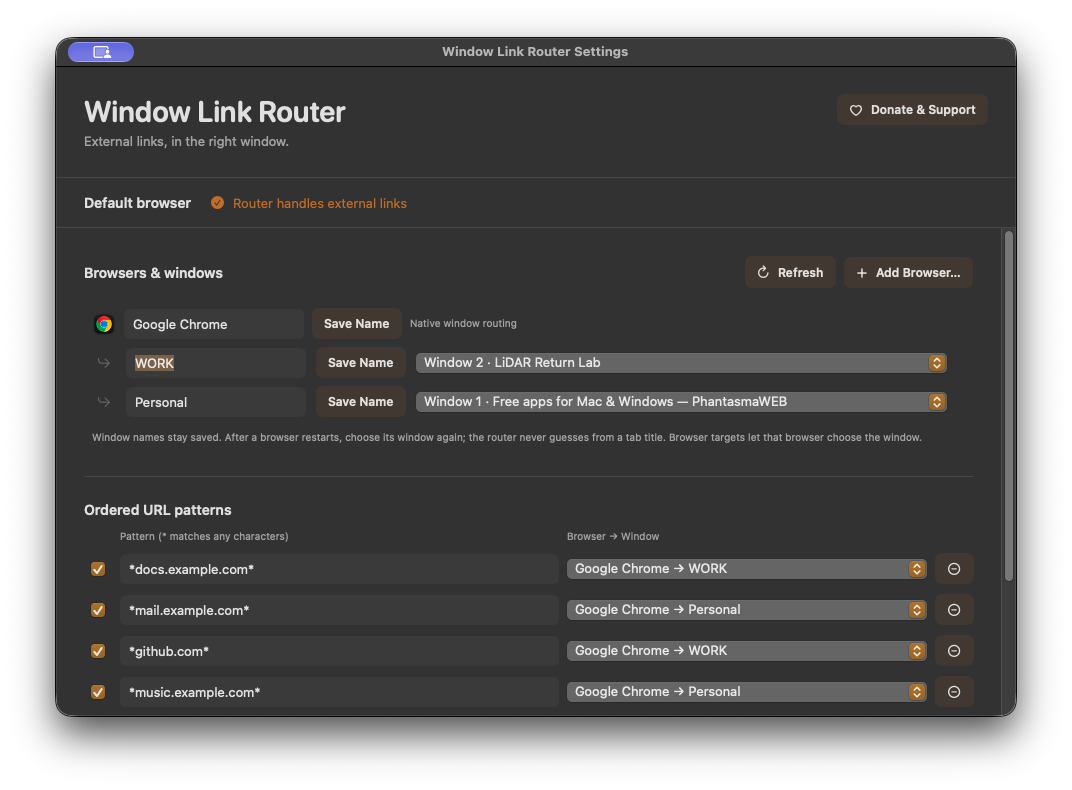
Name your windows
Keep separate windows for work, personal browsing and individual projects. Give each existing Chrome or Safari window a persistent name, so links land in the context you intended.
Make your own rules
Match URLs with ordered, case-insensitive wildcard rules. Send matching links straight to the window you choose.
Choose your browsers
Add installed browser applications and give them clear names. Chrome and Safari can target named windows; browsers without native window control open links in the chosen browser.
Choose a fallback
Use a default window or ask every time. If a named window is closed, the window picker lets you choose another destination.
A little more detail.
Compatibility
macOS 14 or later on Apple silicon. Chrome and Safari support named-window routing with Automation permission; other installed browsers use browser-level routing. Set Window Link Router as the default handler for web links to route links opened by other apps.
How do I install and update it?
Extract the Mac ZIP and move the app to Applications before opening it. For future releases, open Donate & Support and choose Check for Updates. Download the update and restart to install it in place. Existing settings stay on your Mac. Older builds without the updater need this first upgrade by manual download.
How do routing rules work?
Rules are checked in order. Use * to match part of a URL; matching is case-insensitive. The first matching rule chooses the destination window.
What happens when a window is closed?
The app shows a destination picker instead of silently sending a link to a missing window. Browser-only destinations let the browser choose its own window.
Does it upload my links or browsing history?
No. Routing and window information stay on your Mac.
A question or a kind gesture?
Your recordings, videos, settings and routing stay on your device. Update checks contact our release server to look for a newer version. Send a bug report, ask for help, or support development. Donations are entirely optional.